Showing posts with label Valueset. Show all posts

Monday, 27 March 2017

How to design An Accounting Flexfield Parameter for your Report

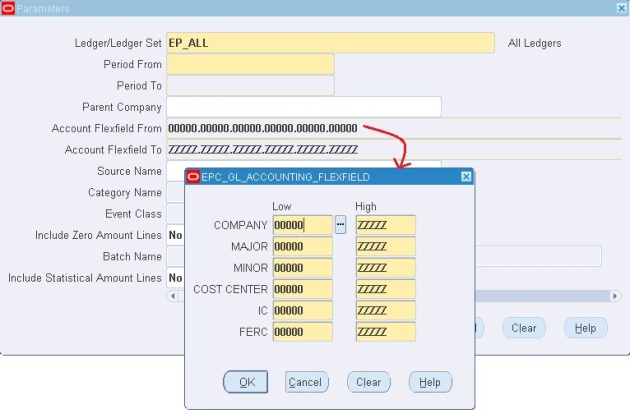
If you want to design similar functionality as below in your report parameter, do the below steps.
Concurrent Program
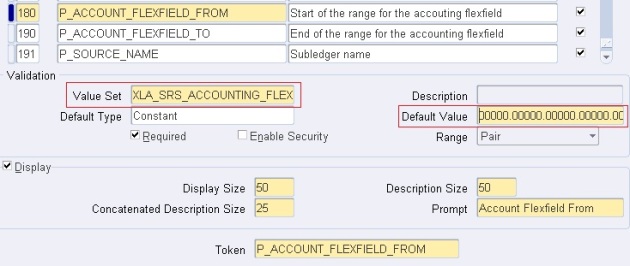
1] Design two parameters to capture Accounting Flexfield From and To and use them in your report. Also set the default values.
CP Parameters
Here use the value set: XLA_SRS_ACCOUNTING_FLEXFIELD
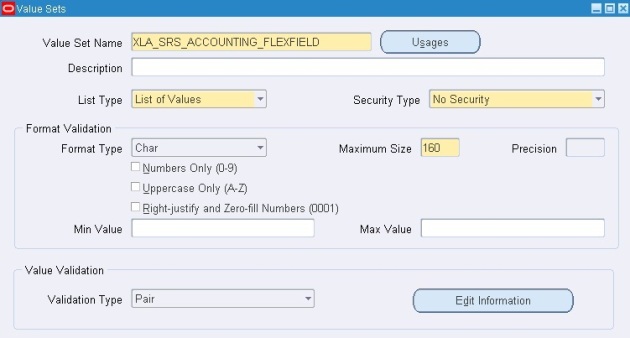
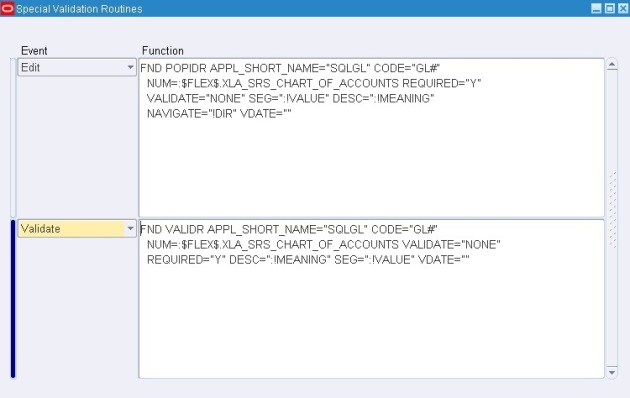
2] XLA_SRS_ACCOUNTING_FLEXFIELD valueset is designed as below:
XLA_SRS_ACCOUNTING_FLEXFIELD
Edit:
FND POPIDR APPL_SHORT_NAME=”SQLGL” CODE=”GL#”
  NUM=:$FLEX$.XLA_SRS_CHART_OF_ACCOUNTS REQUIRED=”Y”
  VALIDATE=”NONE” SEG=”:!VALUE” DESC=”:!MEANING”
  NAVIGATE=”!DIR” VDATE=””
Validate:
FND VALIDR APPL_SHORT_NAME=”SQLGL” CODE=”GL#”
  NUM=:$FLEX$.XLA_SRS_CHART_OF_ACCOUNTS VALIDATE=”NONE”
  REQUIRED=”Y” DESC=”:!MEANING” SEG=”:!VALUE” VDATE=””
Special Value set

Thursday, 17 July 2014

Independent Value set Details Query


/* Formatted on 7/17/2014 1:10:33 PM (QP5 v5.115.810.9015) */
SELECT ffvs.flex_value_set_id,
       ffvs.flex_value_set_name,
       ffvs.description set_description,
       ffvs.validation_type ,
       ffv.flex_value_id,
       ffv.flex_value,
       ffvt.flex_value_meaning,
       ffvt.description value_description
FROM fnd_flex_value_sets ffvs, fnd_flex_values ffv, fnd_flex_values_tl ffvt
WHERE     ffvs.flex_value_set_name = 'BIS_YES_NO'
      AND ffvs.flex_value_set_id = ffv.flex_value_set_id
      AND ffv.flex_value_id = ffvt.flex_value_id
      AND ffvt.language = USERENV ('LANG')

Value Set not available for 'Value Set' Field Query

/* Formatted on 7/17/2014 1:05:43 PM (QP5 v5.115.810.9015) */
SELECT flex_value_set_name,
       vt.meaning validation_type_meaning,
       ft.meaning format_type_meaning,
       v.description,
       v.flex_value_set_id
FROM fnd_flex_value_sets v,
     fnd_lookups vt,
     fnd_lookups ft,
     fnd_flex_validation_tables t
WHERE (UPPER (flex_value_set_name) LIKE :1
       AND (   flex_value_set_name LIKE :2
            OR flex_value_set_name LIKE :3
            OR flex_value_set_name LIKE :4
            OR flex_value_set_name LIKE :5))
      AND (    vt.lookup_type = 'SEG_VAL_TYPES'
           AND vt.lookup_code = v.validation_type
           AND ft.lookup_type = 'FIELD_TYPE'
           AND ft.lookup_code = v.format_type
           AND v.flex_value_set_id = t.flex_value_set_id(+)
           AND v.flex_value_set_name NOT LIKE '$FLEX$.%'
           AND v.validation_type IN ('I', 'F')
           AND v.format_type = 'C'
           AND v.alphanumeric_allowed_flag = 'Y'
           AND v.uppercase_only_flag = 'N'
           AND v.numeric_mode_enabled_flag = 'N'
           AND ( (v.validation_type = 'I' AND v.maximum_size <= 30)
                OR (    v.validation_type = 'F'
                    AND v.maximum_size <= 80
                    AND t.id_column_type IN ('C', 'V')
                    AND t.id_column_size <= 30
                    AND t.value_column_type IN ('C', 'V')
                    AND t.value_column_size <= 80)))
ORDER BY v.flex_value_set_name

Thursday, 29 May 2014

Query to find Parameters and Value Sets associated with a Concurrent Program

SELECT
        fcpl.user_concurrent_program_name "Concurrent Program Name",
        fcp.concurrent_program_name "Short Name",
        fdfcuv.column_seq_num "Column Seq Number",
        fdfcuv.end_user_column_name "Parameter Name",
        fdfcuv.form_left_prompt "Prompt",
        fdfcuv.enabled_flag " Enabled Flag",
        fdfcuv.required_flag "Required Flag",
        fdfcuv.display_flag "Display Flag",
        fdfcuv.flex_value_set_id "Value Set Id",
        ffvs.flex_value_set_name "Value Set Name",
        flv.meaning "Default Type",
        fdfcuv.DEFAULT_VALUE "Default Value"
 
FROM
        fnd_concurrent_programs fcp,
        fnd_concurrent_programs_tl fcpl,
        fnd_descr_flex_col_usage_vl fdfcuv,
        fnd_flex_value_sets ffvs,
        fnd_lookup_values flv
 
WHERE
        fcp.concurrent_program_id = fcpl.concurrent_program_id
        AND    fcpl.user_concurrent_program_name = :conc_prg_name
        AND    fdfcuv.descriptive_flexfield_name = '$SRS$.'
                 || fcp.concurrent_program_name
        AND    ffvs.flex_value_set_id = fdfcuv.flex_value_set_id
        AND    flv.lookup_type(+) = 'FLEX_DEFAULT_TYPE'
        AND    flv.lookup_code(+) = fdfcuv.default_type
        AND    fcpl.LANGUAGE = USERENV ('LANG')
        AND    flv.LANGUAGE(+) = USERENV ('LANG')
 
ORDER BY fdfcuv.column_seq_num;

Thursday, 15 May 2014

Using $PROFILES$ in Value sets in Oracle

When we open a form, some values are pre-loaded in some dynamic variables like Person_id , organization_id, user_id etc.

We can use these values to limit the results.

Let me show you an example...its an easy one.

I will show employee date of birth in a form filed based on its Person id loaded in $PROFILES$.Value

It is same like creating a Table Validated value with a little change in WHERE CLAUSE

See: How to create Table Validated Value set


Lets create a value set.

Using $PROFILES$ in Value sets in Oracle

Press "Edit Information"


Using $PROFILES$ in Value sets in Oracle


WHERE SYSDATE BETWEEN EFFECTIVE_START_DATE AND EFFECTIVE_END_DATE
AND PERSON_ID = :$PROFILES$.PER_PERSON_ID ( Automatically passed)

After i attached the value set to a field, Here is the result.

Using $PROFILES$ in Value sets in Oracle

Value Sets in Oracle Apps

Validation type 'Translatable Dependent' in Value sets in Oracle

Definition:- A Translatable Dependent value set is similar to Dependent value set in that the available values in the list and the meaning of a given value depend on which independent value was selected in a prior segment of the flexfield structure. However, a translated value can be used.

Flexfield Value Security cannot be used with Translatable Independent or Translatable Dependent value sets.

Note: The Accounting Flexfield does not support Translatable Independent and Translatable Dependent value sets.

Lets create a Translatable dependent value set based on parent value set we created in an earlier post.

Translatable Independent Value set


Lets create a Translatable dependent value set.

Translatable Dependent Value sets in Oracle

Select the parent value set. i.e. XX_INDEPENDENT_VALUE_SET

Translatable Dependent Value sets in Oracle


Enter values against each parent value of XX_INDEPENDENT_VALUE_SET which we selected as parent for XX_DEPENDENT_VALUE_SET.

Translatable Dependent Value sets in Oracle

After attachment of value set to a form field, result was as below.

Translatable Dependent Value sets in Oracle


Please note that values saved for these value sets will be PAK for Pakistan and LHR for Lahore.

Value Sets in Oracle Apps

I hope you enjoyed the post.

Validation type 'Translatable Independent' in Value sets in Oracle

Definition:- A Translatable Independent value set is similar to Independent value set in that it provides a predefined list of values for a segment. However, a translated value can be used.

Lets take a scenario...Consider we want to provide list of values of countries and but want to return their shot code like PAK, USA etc. So we need to create a Translatable Independent to achieve this task.

I created a value set show below.

Translatable Independent Value sets in Oracle


Now lets enter its values from Flexfield values form:-

Translatable Independent Value sets in Oracle


After i attached the value set to a form field, result was shown as below. Short code like PAK, BAN will be saved in the database. 

Translatable Independent Value sets in Oracle


Another example can be, if you want to show data in one format and value be returned in different format. 

Display                     Return value

Dammam- Lahore       DMM-LHR

Colombo-Jeddah         JDH-CLM

Leave a comment for any query.

Monday, 5 May 2014

How To Create an Independent Value Set

An Independent value set is a value set with predefined list of values. For example if you want to create a value set for “Sex” field in your form, you may use this type of value set. To create an independent value set, follow the steps below :

1. Responsibility : Application Developer
2. Navigate to Application > Validation > Set.


http://oracleappsebs.com/wp-content/uploads/2013/07/value-set-navigation1-262x300.png

3. Fill in the details in the form as shown in the screenshot below. Make sure you select validation type as Independent.

http://oracleappsebs.com/wp-content/uploads/2013/07/value-set-form.png

4. Save the form and close it.

5. Navigate to Application > Validation > Values. Using this form you will define values for your value set.

6. Search for your you value set name.

http://oracleappsebs.com/wp-content/uploads/2013/07/search-value-set.png

7. Click on any row in the Value column under Values, Effective tab and click on add new button to enter values for your value set as shown in the screen shot below.

http://oracleappsebs.com/wp-content/uploads/2013/07/value-set-values.png

8. Save and Exit.

Sunday, 29 December 2013

Value Set Definition

-- Setup > Financials > Flexfields > Validation > Sets

/* Formatted on 12/29/2013 1:02:28 PM (QP5 v5.114.809.3010) */
SELECT   ffvs.flex_value_set_name name,
         DECODE (ffvs.longlist_flag,
                 'N', 'List of Values',
                 'X', 'Poplist',
                 'Y', 'Long List of Values',
                 'Other')
            list_type,
         DECODE (ffvs.security_enabled_flag,
                 'N', 'No Security',
                 'Y', 'Non-Hierarchical Security',
                 'H', 'Hierarchical Security',
                 'Other')
            security_type,
         DECODE (ffvs.format_type,
                 'C', 'Char',
                 'D', 'Date',
                 'T', 'DateTime',
                 'N', 'Number',
                 'X', 'Standard Date',
                 'Y', 'Standard DateTime',
                 'I', 'Time',
                 'NULL')
            format_type,
         DECODE (ffvs.validation_type,
                 'Y',
                 'Translatable Dependent',
                 'X',
                 'Translatable Independent',
                 'F',
                 'Table',
                 'U',
                 'Special',
                 'D',
                 'Dependent',
                 'I',
                 'Independent',
                 'N',
                 'None',
                 'P',
                 'Pair')
            validation_type,
         ffvs.maximum_size max_size,
         ffvs.number_precision precision,
         CASE WHEN ffvs.format_type = 'N' THEN 'Y' ELSE 'N' END numbers_only,
         ffvs.numeric_mode_enabled_flag right_justify,
         ffvs.uppercase_only_flag uppercase,
         ffvs.protected_flag,
         ffvs.security_enabled_flag,
         ffvs.uppercase_only_flag,
         ffvs.dependant_default_value,
         ffvs.dependant_default_meaning,
         ffvs2.flex_value_set_name independent_value_set,
         ffvs.description
  FROM   applsys.fnd_flex_value_sets ffvs, applsys.fnd_flex_value_sets ffvs2
 WHERE       ffvs.parent_flex_value_set_id = ffvs2.flex_value_set_id(+)
         AND ffvs.flex_value_set_name IN ('POA_EUL_LIST')
         AND 1 = 1

Friday, 7 June 2013

Value Sets:

It is list of values (LOV) with validations, it will be used to restrict the end user not to enter invalid data.
None: Used to give format conditions like maximum size, only numbers, only characters etc.
Independent: Create the value set name by giving the validation type as ‘independent’. Then enter the values for this set.
Dependent: The list of values will be depends on the independent value set.
Table: If we want to get the values from database table as LOV then we will use this value set.
Translation Independent & Translation Dependent:
Just like Independent and Dependent but values are visible in other than American English language which was mentioned.
Special and Pair: To display values of flex fields.
Executable: It is user defined window where we will mention execution filename, execution method and application name.
Concurrent Program: The combination of application name plus program name uniquely identifies your concurrent program.
Request Group: It is collection of concurrent programs and reports.
Responsibility: It is level of an authority where we will combine request group, menu and data group.
SRS(Standard Request Submission) Window: By using this window we can submit the Concurrent Programs.

SELECT * FROM FND_EXECUTABLES WHERE TRUNC(CREATION_DATE)=TRUNC(SYSDATE)
SELECT * FROM FND_CONCURRENT_PROGRAMS WHERE
TRUNC(CREATION_DATE)=TRUNC(SYSDATE)
SELECT * FROM FND_REQUEST_GROUPS WHERE
TRUNC(CREATION_DATE)=TRUNC(SYSDATE)
SELECT * FROM FND_USER WHERE TRUNC(CREATION_DATE)=TRUNC(SYSDATE)


Standards for Report Registration in Oracle Application:
Define one mandatory user parameter ‘P_CONC_REQUEST_ID’
Call the user exit from Before Report Trigger
SRW.USER_EXIT(‘FND SRWINIT’)
Call the another user exit from After Report Trigger
SRW.USER_EXIT(‘FND SRWEXIT’)

P_CONC_REQUEST_ID: We have to define this bind variable in reports where we are using user exits.
When we submit any Concurrent Program from SRS window request id will be generated, this will be transferred to this variable.
Based on this request id  USER_EXITS will be working in reports.
Value Sets:
It is list of values (LOV) with validations, it will be used to restrict the end user not to enter invalid data.
None: Used to give format conditions like maximum size, only numbers, only characters etc.
Independent: Create the value set name by giving the validation type as ‘independent’. Then enter the values for this set.
Dependent: The list of values will be depends on the independent value set.
Table: If we want to get the values from database table as LOV then we will use this value set.
Translation Independent & Translation Dependent:
Just like Independent and Dependent but values are visible in other than American English language which was mentioned.
Special and Pair: To display values of flex fields.
Executable: It is user defined window where we will mention execution filename, execution method and application name.
Concurrent Program: The combination of application name plus program name uniquely identifies your concurrent program.
Request Group: It is collection of concurrent programs and reports.
Responsibility: It is level of an authority where we will combine request group, menu and data group.
SRS(Standard Request Submission) Window: By using this window we can submit the Concurrent Programs.

SELECT * FROM FND_EXECUTABLES WHERE TRUNC(CREATION_DATE)=TRUNC(SYSDATE)
SELECT * FROM FND_CONCURRENT_PROGRAMS WHERE
TRUNC(CREATION_DATE)=TRUNC(SYSDATE)
SELECT * FROM FND_REQUEST_GROUPS WHERE
TRUNC(CREATION_DATE)=TRUNC(SYSDATE)
SELECT * FROM FND_USER WHERE TRUNC(CREATION_DATE)=TRUNC(SYSDATE)


Standards for Report Registration in Oracle Application:
Define one mandatory user parameter ‘P_CONC_REQUEST_ID’
Call the user exit from Before Report Trigger
SRW.USER_EXIT(‘FND SRWINIT’)
Call the another user exit from After Report Trigger
SRW.USER_EXIT(‘FND SRWEXIT’)

P_CONC_REQUEST_ID: We have to define this bind variable in reports where we are using user exits.
When we submit any Concurrent Program from SRS window request id will be generated, this will be transferred to this variable.
Based on this request id  USER_EXITS will be working in reports.
Value Sets:
It is list of values (LOV) with validations, it will be used to restrict the end user not to enter invalid data.
None: Used to give format conditions like maximum size, only numbers, only characters etc.
Independent: Create the value set name by giving the validation type as ‘independent’. Then enter the values for this set.
Dependent: The list of values will be depends on the independent value set.
Table: If we want to get the values from database table as LOV then we will use this value set.
Translation Independent & Translation Dependent:
Just like Independent and Dependent but values are visible in other than American English language which was mentioned.
Special and Pair: To display values of flex fields.
Executable: It is user defined window where we will mention execution filename, execution method and application name.
Concurrent Program: The combination of application name plus program name uniquely identifies your concurrent program.
Request Group: It is collection of concurrent programs and reports.
Responsibility: It is level of an authority where we will combine request group, menu and data group.
SRS(Standard Request Submission) Window: By using this window we can submit the Concurrent Programs.

SELECT * FROM FND_EXECUTABLES WHERE TRUNC(CREATION_DATE)=TRUNC(SYSDATE)
SELECT * FROM FND_CONCURRENT_PROGRAMS WHERE
TRUNC(CREATION_DATE)=TRUNC(SYSDATE)
SELECT * FROM FND_REQUEST_GROUPS WHERE
TRUNC(CREATION_DATE)=TRUNC(SYSDATE)
SELECT * FROM FND_USER WHERE TRUNC(CREATION_DATE)=TRUNC(SYSDATE)


Standards for Report Registration in Oracle Application:
Define one mandatory user parameter ‘P_CONC_REQUEST_ID’
Call the user exit from Before Report Trigger
SRW.USER_EXIT(‘FND SRWINIT’)
Call the another user exit from After Report Trigger
SRW.USER_EXIT(‘FND SRWEXIT’)

P_CONC_REQUEST_ID: We have to define this bind variable in reports where we are using user exits.
When we submit any Concurrent Program from SRS window request id will be generated, this will be transferred to this variable.
Based on this request id  USER_EXITS will be working in reports.

USER EXISTS:
User Exit is one of the program which will transfer the control from report builder executable to 3rd generation language to get information and completes remaining process.
Total we have five user exits:
FND SRWINIT: We will call this user exist from before report trigger to retrieve user profile values like user id, Responsibility name etc.
FND SRWEXIT: We will call this user exist from after report trigger to freeze the memory which is occupied by user profile values.
FND FLEXSQL: Used to display the flex fields information.
FND FLEXIDVAL: Used to display the flex fields information.
FND FORMATCURRENCY: Used for multiple Currency Reporting.

REPORT PARAMETERS:
If report is having bind parameters we have to define those parameters while registering concurrent program.
 Select ‘parameters’ Button ,enter the seq no and give the parameter name.
VALUESET: It is nothing but list of values which will validate the data.
TOKEN: Token is one of the field which will be used to map concurrent program parameter with report builder bind variable. we have to mention the bind variable name in this token field.

Default Types:
When we want to pass default values for concurrent program parameter then we will use default types. We have 4 default types:
Constant: We can pass constant number or string default value.
Sql Statement: We can define valid SQL settlement (select statement), the result of this query will be pass as default value. This query should retrieve only one value.
Segment: When we want to get any other parameter value as default then we will use this one.
Profile: We will use this one to pass the profile values like org_id, user_id etc as default value.

Out parameters in procedure:
Errbuf: Will be used to send error messages into logfile if any error occurs inside of procedure.
Retcode: Will be used to find out concurrent program status whether it has been completed successfully.
Warnings or errors:
Successfulà0
Warningà1
Errorà2

Fnd File APIs:
We can’t use dbms_output.put_line in oracle applications we will use fnd_file APIs to write the message into output files as well as log files.
Fnd_file.put_line(fnd_file.output,’message’):   Writes the messages into output file.
Fnd_file.put_line(fnd_file.log,’message’):    Writes the messages into log file.
Wednesday, 8 May 2013

Special Value Set in Oracle Apps

Special value set configuration and uses.
I have observed that many times we need to restrict users to a limited, conditional value entries either in DFF or when submitting concurrent request. Normally we can use dependent value set, but when dynamic or some specific check is required, then special value set is better and only choice. Below I have described all the steps for configuring value set. Assign this value set to DFF or concurrent req. parameter as required.

1. Go to Application Developer --> Application --> Validation --> Set.
2. Create a new value set - Enter value set name, description, List type = List of values.
3. Select Validation Type = Special from left bottom of the screen.
4. Click on Edit information.
5. Select Event = Validate.
6. Now in function, you can write pl/sql code or call any function from database.
7. The logic of validation will be as per requirement.
8. The code syntax will be FND PLSQL " entire function "
9. To read the value which user has entered in DFF or as conc. request paremeter, use lc_in := :!value;
10. To raise error if the enter value is not correct, use fnd_message.raise_error;
11. Use Application message. Display appropiate message.
12. Raising error makes sure that user cannot continue with the invalid value and he will be fored to corret entry.
13. The character size is limited, but by calling database function, one can put complex validation.

-- Below is the code to validate that user can select a date which is 3 months before sysdate. This is a parementer in report in which user should be allowed to see data for 3 months or before, but he cannot see recent quater data.

FND PLSQL "declare

l_value varchar2( 20 ) := :!value ;
l_valid NUMBER := 0 ;
BEGIN 
SELECT (sysdate - to_date(l_value,'dd-mon-yyyy')) 
INTO       l_valid
FROM    dual;
IF (l_valid <= 91) THEN 
fnd_message.set_name( 'FND', 'FND_GENERIC_MESSAGE' ) ;
fnd_message.set_token( 'MESSAGE', 'Date must be atleast 3 calendar months prior to current 
ate' );
fnd_message.raise_error ;
END IF ;
END;
"

Other Example:


Special Value Sets in Oracle Applications

Here I am going to explain Special Value Sets in Oracle Applications.I have a requirement in which I want to execute a BIP report with some parameters.
The first parameter Current Month should allow only MON-YYYY format.Schedule Start Date and Schedule End Dateshould be with in first parameter month.
Approach 1

If the report is through PL/SQL Stored Procedure executable the we can do all the validation in backend.
Approach 2

Second approach is through Special Value Sets.This value set has events like Edit,Load and Validate.We can attach PL/SQL code snippet to each event.Here I am going to attach validation routine to Validate event to validate the user input.Validate event fires when the focus leaves from the item.
Here I am going to create two special value sets ( one for first parameter and another for the second and third parameter).
Value Set 1

Name : XXCUST_CURRENT_MONTH
List Type : List of Values
Format Type : Char
Maximum Size : 8
Validation Type : Special
Event : Validate
Function : XXCUST_CURRENT_MONTH_VALIDATE_ROUTINE

Value Set 2

Name : XXCUST_DATES
List Type : List of Values
Format Type : Standard Date
Validation Type : Special
Event : Validate
Function : XXCUST_DATES_VALIDATE_ROUTINE
Note: Inside the validate routine I am using FND messages.Generate message file also using "FNDMDGEN apps/password 0 Y US XXCUST DB_TO_RUNTIME".
Attach XXCUST_CURRENT_MONTH to first parameter.Also XXCUST_DATES to second and third parameter.
Note: Since the program is using Special Value Sets it can be submit only through Oracle Forms.Submission through OA Framework and PL/SQL APIs are not recommended.
Output

Give Current Date as 01-2012
Give Schedule Start Date out of current month.