Showing posts with label Contorl file SQL *Loader. Show all posts

Monday, 25 November 2013

Tips and Tricks with SQL Loader

Following are some of the tips and tricks that can be used with SQL Loader

1) Load text for a column which is having more than 4000 bytes.
Use following syntax
LOAD DATA
APPEND INTO TABLE sv_test
FIELDS TERMINATED BY '|' TRAILING NULLCOLS
(
  long_text_columns char(40000)
)


2) How to use oracle functions with SQL Loader
LOAD DATA
APPEND INTO TABLE sv_test
FIELDS TERMINATED BY '|' TRAILING NULLCOLS
(
  long_text_columns char(40000)   --- first 40000 characters
, column1  "trim(:column1)"       --- Trims and loads
, column2  "replace(:column2,'\n',chr(10))"  --- replace \n with new line
, column3  DATE "DD-MON-YYYY"   --- defining date style
, column4  "upper(:column4)"      --- changing to upper case
, column5  "lower(:column5)"      --- changing to lower case
, column6  constant "FIXED"      --- assigning a constant value
, column7  "sv_sequence.nextval"  --- defaulting a value from sequence
)

Monday, 17 June 2013

How to register SQL Loader

 
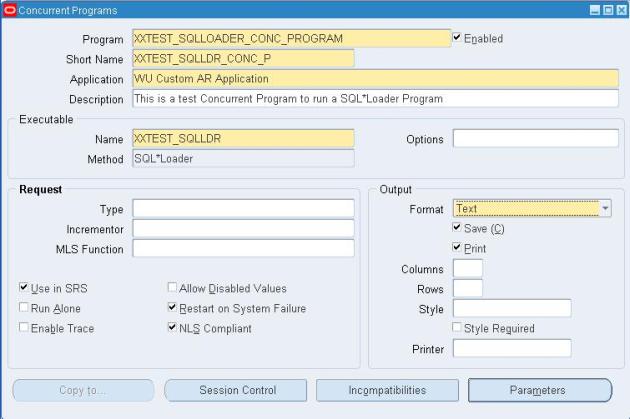
Go to Application Developer > Concurrent > Executables. Define a Concurrent Program Executable. Choose the Execution Method as SQL*Loader and give the Execution File Name as the name of the SQL*Loader control file. Save your work.

Step 3]
Go to Application Developer > Concurrent > Program. Define the Concurrent Program. Attach the executable defined above.

Step 4]
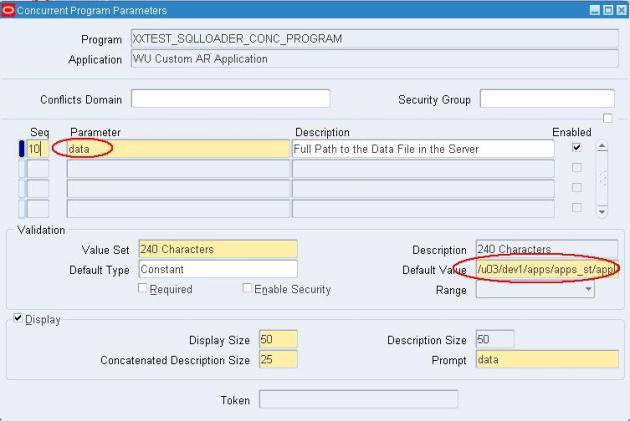
Go to parameters of the concurrent program. Create a parameter to take the server path of the data file. You can also place the default value.

Step 5]
Attach the Concurrent program to a Responsibility through a Request Group.


What is SQL*Loader and what is it used for?
SQL*Loader is a bulk loader utility used for moving data from external files into the Oracle database. Its syntax is similar to that of the DB2 Load utility, but comes with more options. SQL*Loader supports various load formats, selective loading, and multi-table loads.

How does one use the SQL*Loader utility?
One can load data into an Oracle database by using the sqlldr (sqlload on some platforms) utility. Invoke the utility without arguments to get a list of available parameters. Look at the following example:
sqlldr scott/tiger control=loader.ctl
This sample control file (loader.ctl) will load an external data file containing delimited data: load data

infile 'c:\data\mydata.csv'
into table emp ( empno, empname, sal, deptno )
fields terminated by "," optionally enclosed by '"'

The mydata.csv file may look like this:

10001,"Scott Tiger", 1000, 40
10002,"Frank Naude", 500, 20

Another Sample control file with in-line data formatted as fix length records. The trick is to specify "*" as the name of the data file, and use BEGINDATA to start the data section in the control file.
load data

infile *
replace
into table departments
( dept position (02:05) char(4),
deptname position (08:27) char(20) )
begindata
COSC COMPUTER SCIENCE
ENGL ENGLISH LITERATURE
MATH MATHEMATICS
POLY POLITICAL SCIENCE

Is there a SQL*Unloader to download data to a flat file?

Oracle does not supply any data unload utilities. However, you can use SQL*Plus to select and format your data and then spool it to a file:
set echo off newpage 0 space 0 pagesize 0 feed off head off trimspool on
spool oradata.txt
select col1 ',' col2 ',' col3
from tab1
where col2 = 'XYZ';
spool off
Alternatively use the UTL_FILE PL/SQL package:

Remember to update initSID.ora, utl_file_dir='c:\oradata' parameter
declare
fp utl_file.file_type;
begin
fp := utl_file.fopen('c:\oradata','tab1.txt','w');
utl_file.putf(fp, '%s, %s\n', 'TextField', 55);
utl_file.fclose(fp);
end;
/
You might also want to investigate third party tools like TOAD or ManageIT Fast Unloader from CA to help you unload data from Oracle.

Can one load variable and fix length data records?

Yes, look at the following control file examples. In the first we will load delimited data (variable length):
LOAD DATA
INFILE *
INTO TABLE load_delimited_data
FIELDS TERMINATED BY "," OPTIONALLY ENCLOSED BY '"'
TRAILING NULLCOLS
( data1, data2 )
BEGINDATA
11111,AAAAAAAAAA
22222,"A,B,C,D,"

If you need to load positional data (fixed length), look at the following control file example: LOAD DATA
INFILE *
INTO TABLE load_positional_data
( data1 POSITION(1:5),
data2 POSITION(6:15) )
BEGINDATA
11111AAAAAAAAAA
22222BBBBBBBBBB

Can one skip header records load while loading?

Use the "SKIP n" keyword, where n = number of logical rows to skip. Look at this example: LOAD DATA
INFILE *
INTO TABLE load_positional_data
SKIP 5
( data1 POSITION(1:5),
data2 POSITION(6:15) )
BEGINDATA
11111AAAAAAAAAA
22222BBBBBBBBBB

Can one modify data as it loads into the database?
Data can be modified as it loads into the Oracle Database. Note that this only applies for the conventional load path and not for direct path loads.
LOAD DATA
INFILE *
INTO TABLE modified_data
( rec_no "my_db_sequence.nextval",
region CONSTANT '31',
time_loaded "to_char(SYSDATE, 'HH24:MI')",
data1 POSITION(1:5) ":data1/100",
data2 POSITION(6:15) "upper(:data2)",
data3 POSITION(16:22)"to_date(:data3, 'YYMMDD')" )
BEGINDATA
11111AAAAAAAAAA991201
22222BBBBBBBBBB990112

LOAD DATA
INFILE 'mail_orders.txt'
BADFILE 'bad_orders.txt'
APPEND
INTO TABLE mailing_list
FIELDS TERMINATED BY ","
( addr,
city,
state,
zipcode,
mailing_addr "decode(:mailing_addr, null, :addr, :mailing_addr)",
mailing_city "decode(:mailing_city, null, :city, :mailing_city)",
mailing_state )

Can one load data into multiple tables at once?
Look at the following control file:
LOAD DATA
INFILE *
REPLACE
INTO TABLE emp
WHEN empno != ' '
( empno POSITION(1:4) INTEGER EXTERNAL,
ename POSITION(6:15) CHAR,
deptno POSITION(17:18) CHAR,
mgr POSITION(20:23) INTEGER EXTERNAL )
INTO TABLE proj
WHEN projno != ' '
( projno POSITION(25:27) INTEGER EXTERNAL,
empno POSITION(1:4) INTEGER EXTERNAL )

Can one selectively load only the records that one need?

Look at this example, (01) is the first character, (30:37) are characters 30 to 37:
LOAD DATA
INFILE 'mydata.dat'
BADFILE 'mydata.bad'
DISCARDFILE 'mydata.dis'
APPEND
INTO TABLE my_selective_table
WHEN (01) <> 'H' and (01) <> 'T' and (30:37) = '19991217'
( region CONSTANT '31',
service_key POSITION(01:11) INTEGER EXTERNAL,
call_b_no POSITION(12:29) CHAR )

Can one skip certain columns while loading data?

One cannot use POSTION(x:y) with delimited data. Luckily, from Oracle 8i one can specify FILLER columns. FILLER columns are used to skip columns/fields in the load file, ignoring fields that one does not want. Look at this example:
LOAD DATA
TRUNCATE
INTO TABLE T1
FIELDS TERMINATED BY ','
( field1,
field2 FILLER,
field3 )

How does one load multi-line records?

One can create one logical record from multiple physical records using one of the following two clauses:
CONCATENATE: - use when SQL*Loader should combine the same number of physical records together to form one logical record.
CONTINUEIF - use if a condition indicates that multiple records should be treated as one. Eg. by having a '#' character in column 1.

How can get SQL*Loader to COMMIT only at the end of the load file?

One cannot, but by setting the ROWS= parameter to a large value, committing can be reduced. Make sure you have big rollback segments ready when you use a high value for ROWS=.

Can one improve the performance of SQL*Loader?

A very simple but easily overlooked hint is not to have any indexes and/or constraints (primary key) on your load tables during the load process. This will significantly slow down load times even with ROWS= set to a high value.
Add the following option in the command line: DIRECT=TRUE. This will effectively bypass most of the RDBMS processing. However, there are cases when you can't use direct load. Refer to chapter 8 on Oracle server Utilities manual.
Turn off database logging by specifying the UNRECOVERABLE option. This option can only be used with direct data loads.
Run multiple load jobs concurrently.

What is the difference between the conventional and direct path loader?

The conventional path loader essentially loads the data by using standard INSERT statements. The direct path loader (DIRECT=TRUE) bypasses much of the logic involved with that, and loads directly into the Oracle data files. More information about the restrictions of direct path loading can be obtained from the Utilities Users Guide.

Wednesday, 8 May 2013

SQL LOADER ..

SQL LOADER is an Oracle utility used to load data into table given a datafile which has the records that need to be loaded. SQL*Loader takes data file, as well as a control file, to insert data into the table. When a Control file is executed, it can create Three (3) files called log file, bad file or reject file, discard file.
  • Log file tells you the state of the tables and indexes and the number of logical records already read from the input datafile. This information can be used to resume the load where it left off. 
  • Bad file or reject file gives you the records that were rejected because of formatting errors or because they caused Oracle errors. 
  • Discard file specifies the records that do not meet any of the loading criteria like when any of the WHEN clauses specified in the control file. These records differ from rejected records.
Structure of a Control file:
Sample CTL file for loading a Variable record data file:
OPTIONS (SKIP = 1,, ERRORS=99, ROWS=100)   –The first row in the data file is skipped without loading and With Will Allow fro 99 errors while loadig and
Rows=100 means , For Every 100 Rows auto commit will happens.
LOAD DATA 
INFILE ‘$FILE’             — Specify the data file  path and name
APPEND                       – type of loading (INSERT, APPEND, REPLACE, TRUNCATE
INTO TABLE “APPS”.”BUDGET”   – the table to be loaded into
FIELDS TERMINATED BY ‘|’           – Specify the delimiter if variable format datafile
OPTIONALLY ENCLOSED BY ‘”‘   –the values of the data fields may be enclosed in “
TRAILING NULLCOLS     – columns that are not present in the record treated as null
(ITEM_NUMBER    “TRIM(:ITEM_NUMBER)”, – Can use all SQL functions on columns
QTY                 DECIMAL EXTERNAL,
REVENUE             DECIMAL EXTERNAL, 
EXT_COST            DECIMAL EXTERNAL TERMINATED BY WHITESPACE “(TRIM(:EXT_COST))”  ,
MONTH           “to_char(LAST_DAY(ADD_MONTHS(SYSDATE,-1)),’DD-MON-YY’)” ,
DIVISION_CODE    CONSTANT “AUD”  – Can specify constant value instead of Getting value from datafile
)
OPTION statement precedes the LOAD DATA statement. The OPTIONS parameter allows you to specify runtime arguments in the control file, rather than on the command line. The following arguments can be specified using the OPTIONS parameter. 
SKIP = – Number of logical records to skip (Default 0)
LOAD = n — Number of logical records to load (Default all)
ERRORS = n — Number of errors to allow (Default 50)
ROWS = n   — Number of rows in conventional path bind array or between direct path data saves (Default: Conventional Path 64, Direct path all)
BINDSIZE = n – Size of conventional path bind array in bytes (System-dependent default)
SILENT = {FEEDBACK | ERRORS | DISCARDS | ALL} — Suppress messages during run 
(header, feedback, errors, discards, partitions, all)
DIRECT = {TRUE | FALSE} –Use direct path (Default FALSE)
PARALLEL = {TRUE | FALSE} — Perform parallel load (Default FALSE)
LOADDATA statement is required at the beginning of the control file. 
INFILE: INFILE keyword is used to specify location of the datafile or datafiles. 
INFILE* specifies that the data is found in the control file and not in an external file. INFILE ‘$FILE’, can be used to send the filepath and filename as a parameter when registered as a concurrent program.
INFILE   ‘/home/vision/kap/import2.csv’ specifies the filepath and the filename.
Example where datafile is an external file:
LOAD DATA
INFILE   ‘/home/vision/kap/import2.csv’
INTO TABLE kap_emp
FIELDS TERMINATED BY “,”
( emp_num, emp_name, department_num, department_name )
Example where datafile is in the Control file:
LOAD DATA
INFILE *
INTO TABLE kap_emp
FIELDS TERMINATED BY “,” 
( emp_num, emp_name, department_num, department_name )
BEGINDATA
7369,SMITH,7902,Accounting
7499,ALLEN,7698,Sales
7521,WARD,7698,Accounting
7566,JONES,7839,Sales
7654,MARTIN,7698,Accounting
Example where file name and path is sent as a parameter when registered as a concurrent program
"rtrim(ltrim(replace(:CUSTOMER_NUMBER,chr(13))))"           

LOAD DATA
INFILE ‘$FILE’
INTO TABLE kap_emp
FIELDS TERMINATED BY “,” 
( emp_num, emp_name, department_num, department_name )
TYPE OF LOADING:
INSERT   — If the table you are loading is empty, INSERT can be used.
APPEND  — If data already exists in the table, SQL*Loader appends the new rows to it. If data doesn’t already exist, the new rows are simply loaded. 
REPLACE — All rows in the table are deleted and the new data is loaded
TRUNCATE — SQL*Loader uses the SQL TRUNCATE command.
INTOTABLEis required to identify the table to be loaded into. In the above example INTO TABLE “APPS”.”BUDGET”, APPS refers to the Schema and BUDGET is the Table name.
FIELDS TERMINATED BY specifies how the data fields are terminated in the datafile.(If the file is Comma delimited or Pipe delimited etc)
OPTIONALLY ENCLOSED BY ‘”‘ specifies that data fields may also be enclosed by quotation marks.
TRAILINGNULLCOLS clause tells SQL*Loader to treat any relatively positioned columns that are not present in the record as null columns.
Loading a fixed format data file:
LOAD DATA
INFILE ‘sample.dat’
INTO TABLE emp
(      empno         POSITION(01:04)   INTEGER EXTERNAL,
ename          POSITION(06:15)   CHAR,
job            POSITION(17:25)   CHAR,
mgr            POSITION(27:30)   INTEGER EXTERNAL,
sal            POSITION(32:39)   DECIMAL EXTERNAL,
comm           POSITION(41:48)   DECIMAL EXTERNAL,
deptno         POSITION(50:51)   INTEGER EXTERNAL)
SQL*Loader loads the tables, creates the log file, and returns you to the system prompt. You can check the log file to see the results of running the case study.
Register as concurrent Program:
Place the Control file in $CUSTOM_TOP/bin.
Define the Executable. Give the Execution Method as SQL*LOADER.
Define the Program. Add the Parameter for FILENAME.
Skip columns:
You can skip columns using the ‘FILLER’ option.
Load Data


TRAILING  NULLCOLS
(
name Filler,
Empno ,
sal
)

here the column name will be skipped.

Friday, 19 April 2013

SQL * Loader


It is one of the Oracle Tool will be used to transfer the data from Flat files into
Oracle Base tables.
When we are developing the Interfaces or Conversion program in Oracle Applications
then we will be using the SQL Loader Programs.


while working with SQL * Loader we will come across 5 Files.

1)Flat File OR data File:
Data file contains the data in the specific format which we will receive from the
client. this file will be generated by the legacy system(Other Systems) program.
It may be either .txt format
.dat
.csv(Comma Separated View) Excell sheet.
Most of the times we will receive in the (.csv) format


2)Control File :
—————–
Is nothing but a SQL*Loader Program will be used to load the data from file into table.
we will develop the control File
Execute the Control File.
While developing the Control file we will specify follwoing things.
1)Data File path
2)Database Table Name
3)Column Mapping.
Control file Extension is (.ctl)


3)Bad File:
———–
when we execute the COntrol file if any records are rejected by SQL *Loader then we
will find those rejecteds record in the Bad file.
SQl loader recjects the records if there are any datatype mismatch
Internal Errors
Data file Format problem
Bad File Extension is (.bad)


4)Discard File:
—————
when we execute the COntrol file if any records are rejected by Control File then we
will find those rejecteds record in the Discard file.
Control file Recjects the record when the record is not satisfying the record which
are not satisfied the condition specified in the Control file.
Discard File Extension is (.dis)


5)Log File :
————-

It contains the Log information like Program start time,End Time
No of succesfully records upload
Rejected Records into the Bad file
Rejected records into the Discard file
Any errors are there in the Control file those error message details we will find.
Log file Extension is (.log)


Control File Syntax:
———————-

LOAD DATA
INFILE ‘Data File Path’
Insert into table
FIELDS TERMINATED by ‘,’ OPTIONALLY ENCLOSED BY’”‘
TRAILING NULLCOLS
(Column1 ,
column2 ,
column3 ,……)


Execution of Control File :
—————————–
Goto Command Prompt where the SQl loader is Installed.

D:Oracle\Proddb\8.1.7\bin\ SQLLDR Username/Password@PROD
Control = Control file Path.


============================================
1)Connect to Scott schema create temp table
2)Prepare the data file having some sample records save in the local mechine.
3)Develop the control file like follows.

load data
infile ‘C:\22\LOAD\EMP.txt’
INSERT INTO TABLE EMP_DETAILS22
fields terminated by ‘,’
(empno ,
ename ,
sal ,
job ,
comm ,
tax ,
deptno ,
jdate)


Note: Save the file extension as “.ctl”.

4)Goto Command Propmt through Start Menu = Run = > CMD
5)Connect to following path and execute the control file
D:\Oracle\Proddb\8.1.7\Bin\SQLLDR Scott/Tiger@PROD
Control = C:\22\LOAD\emp_details.ctl

6)test the data in the Table.