Showing posts with label Oracle Property Manager. Show all posts

Wednesday, 16 November 2016

Property Manager integration with Accounts Receivables Module

Here i am going to discuss about property manager integration with accounts receivables. For integrating property manager with accounts receivables below are the mandatory set-ups required.
  • Basic Setup of GL and Ledger
  • Basic Setup of Accounts Receivables
  • Basic setup of Property Manager
for smooth flow of property manager invoices to Accounts Receivables below are the setup required from AR side.

1. Transaction Source
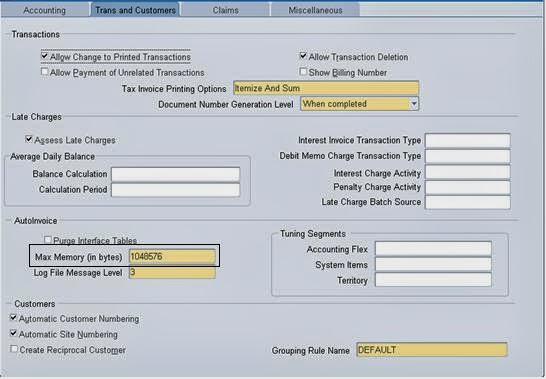
2. Set Max Memory to 1048576 bytes in system options
3. Remit-To Addresses

If any of the above setup are missing then invoice imported from property manager lies in AR interface.


1. Transaction Source: In property manager we have to use the seeded Transaction source "Property Manager Batch Source" . Even if we define our custom source. we will not able to import the invoices into AR. So, use seeded source available.

Navigation : Setup > Transactions > Source


2. Set Max Memory to 1048576 bytes: During receivables setup, Define max memory to 1048576 bytes in Trans and Customers Tab of system options in AR.

Navigation : Setup > System > System Options


3. Remit-To Addresses: Define Remit-To address for operating unit and country.

Navigation : Setup > Print > Remit - To Addresses


Integration of Oracle Property Manager with Other Applications

Oracle Property Manager provides an integrated solution with other Oracle Applications. It integrates with other applications such as General Ledger, Oracle Payables, Oracle Receivables etc. Here is a glimpse of other sub ledgers which are integrated with Oracle Property Manager.

1. Oracle General Ledger:- 
                                              Property Manager  retrieves few setup related information like  chart of account, accounting period types, accounting calendar, ledger, subledger accounting options etc  from General Ledger. Also the normalized accounting entries are transferred from Property Manager to general ledger via Oracle Subledger Accounting module.

2. Oracle Subledger Accounting:- 
                                                         Oracle Property Manager predefines certain setups in Oracle Subledger Accounting like accounting events and event types, sources, account derivation rules etc and these setups will be used when the create accounting program is run in Property Manager.

                                    In addition to that you can transfer normalization-related accounting information from Oracle Property Manager to Oracle Subledger Accounting. Oracle Subledger Accounting creates the appropriate journal entries and transfers them to Oracle General Ledger.

3. Oracle Human Resources (HRMS):- 
                                                                  The employee information which we use in Oracle Property Manager while managing office space and allocating locations to employees, are retrieved from HRMS.
                                         Also in HRMS module we can define a hierarchy of organizations to represent the structure of the company. Once you have created the required organizations, you can classify one or more as operating units. In Oracle Property Manager, operating units are used to partition data. Users create all leases, agreements, contacts, locations, and space assignments for a specific operating unit.

4. Oracle Payables :-  
                                  The owner of the property your organization intends to lease (the landlord) must be set up as a supplier in Oracle Payables and this supplier information will be used while creating a expense lease in Property Manager. Also Property manager uses the other information’s like payment term, distribution set etc which are setup in payables.
Once the leases are created and payments are approved, their invoice information is send to Accounts Payables for invoice creation and for payment processing.

5. Oracle Receivables :- 
                                       In Property Manager, while creating a revenue lease few information which we use like customers, transaction source, transaction types, grouping rules, payment terms etc are retrieved from Oracle Receivables module.

                                     Also once the Revenue leases are created and finalized, billing lines are approved and transferred to Receivables for invoice creation and further the accounting of invoices is sent to General ledger.

                                      In addition to above, Oracle Property Manager module also integrates with Oracle E-Business Tax, Oracle Projects and Oracle Enterprise Asset Management. 

                                      The tax rates which we define in Oracle E-Business Tax appear in the tax input classification or tax output classification LOVs on the term details window. Users can thus associate the appropriate tax rates with lease terms.

                                         You can assign projects which are defined in Oracle Projects module to a location in Oracle Property Manager. By linking locations to projects, your organization can track where project team members are located and the exact costs of space assignment.
The integration between Oracle Property Manager and Oracle Enterprise Asset Management (eAM) enables eAM assets to correspond with locations defined in Oracle Property Manager. Using the Export Locations to Enterprise Asset Management concurrent program we can export location data to Oracle Enterprise Asset Management. 

                                       Oracle Property Manager also uses an open interface to integrate with CAD and CAFM applications. This integration enables you to manipulate and view information about your space definition and usage in either a forms-based or CAFM environment, synchronizing data across applications as required. 

For more details on integration of Property manager with Other subledgers, refer the Property Manager implementation guide.

Oracle Property Manager Set-Up

Hi here i am going to show the venela setup of Property manager. Basic required setup before setting up of property manager are as follows.


  1. Basic Setup GL and Ledger
  2. AP Setup is Required
  3. AR Setup is Required
  4. Projects setup (If Projects are to be integrated with property manager)
But as of now i am not going to discuss projects integration with property manager.Basic setup of GL,AP,AR is done. I am starting the setup of property manager. Below are the steps to setup property manager.
Step No:1. Define Responsibility
Step No:2 Assign Responsibility to the User
Step No:3 Assign Profile Options to the Responsibility
Step No:4 Define System Options
Step No:1 Define Responsibility

Enter Responsibility Name, Menu, Data Group Details and Request Group Details for defining responsibility.


Step No:2 Assign Responsibility to the User

Assign the responsibility to the User
Step No:3 Assign Profile Options to the Responsibility

Assign the required profile options like GL Ldger Name, HR: Security Profile, HR: Business Group, MO: Operating Unit, Default Operating Unit.
Step No:4 Define System Options

Navigation : Setup > Options > System Options
After selecting the Navigation, Below page populates. Select Create Setup Options Button for defining system options
Below Page gets opens. Select the Operating Unit, Ledger and Remaining options as per our requirements

By setting up of system options we are customizing our oracle property manager as per the requirement.

After defining the system options click on apply button. Oracle property manager basic set up is completed.
After saving the work system options looks as below


Monday, 7 November 2016

Oracle Property Manager

Overview – Property Manager 


                                     You can use Oracle Property Manager to manage your properties. You use the information in Oracle Property Manager for the following purposes:
·         To identify and define a property, so that you can associate it with a lease in the Leases window.
·         To define office space, so that you can assign employees and customers to specific offices using the Space Assignment feature.
·         To maintain a comprehensive record of the physical features of a property.
·         To maintain a comprehensive record of contacts associated with the property, including company names, roles, and site information.
·         To simplify reporting.
·         To group buildings together to allow more flexibility in your property management.

Hierarchy of Properties
We can define property in Oracle Property Manager at several levels. When we define a building within a property, the building consists of floors and offices. When we define land within a property, the land consists of parcels and sections.

Properties
We can define a property in the Properties Manger, including the property name and code, and information about the location of the property, such as the region and office park name.

Buildings
We can define buildings in the Property Manager, including the name, alias, tenure, and from and to dates of the building you are defining. Most of the information in the Area and Occupancy tabbed regions is display only at this level, and must be defined at the office level, with the exception of the unit of measure and the gross measurement of the building in the Area tabbed region.

Floors
We can define floors in the Floor window, which we access by selecting the Floors button on the Building window.

Offices
We can define offices in the Office window, which we access by selecting the Offices button on the Floor window. We can define the individual office spaces by office number and suite.

Land, Parcels, and Sections
Defining land is identical to defining buildings. We define land using a three-layered structure that includes defining land in the Land window, defining parcels in the Parcel window, and defining sections in the Section window.

Space Assignment
Use the Space Assignment window to assign, modify, search, and view space assignments. We can assign locations to employees and cost centers. We can modify space assignments to update records or correct assignment information. We can query all space assignments for a particular building, floor, office, land, parcel, or section. We can also query space assignments for a particular employee, customer, or cost center.
We can search for assignments in effect on a specific date. This functionality enables us to plan space assignments in advance and search for future vacancies

Lease Administration
We can automate our lease administration processes by using the lease management features included in the Leases window. We can also manage the calculation of rent amounts and the creation of schedules for invoices. We can set up milestones that correspond to required decisions and actions our need to take at specific times. Milestones help us keep track of these decisions and actions and handle them on a timely basis.

Payments and Billings
Oracle Property Manager includes two features that we use to manage financial transactions for our property. We manage payment schedules to suppliers with the payments feature, and we manage billing schedules to customers with the billings. We set up both types of transactions in Property Manager, and then we export the transaction information to Oracle Payable or Oracle Receivables as shown in the following table:

Approval Rules for Schedules
When Oracle Property Manager first generates the schedule, its status is Draft. We approve a schedule by changing its status to Approved and saving our work. The approval takes effect when we save our work. We can change the payment/billing terms for an item in an approved schedule. This change is incorporated into all items, belonging to the term, that are not exported.

Exporting Payment Items to Oracle Payables
We can export any individual payment item that is included in an approved payment schedule.

Prerequisite:
• Create suppliers.
• Approve

Exporting Billing Items to Oracle Receivables
We can export any individual billing item that is included in an approved billing schedule.

Prepaying Rent Payments or Billings
We can record rent prepayments for both payments and billings. We enter separate payment terms for prepayments. The start date and end date are the same. We enter a target date, which is the rent payment date that the prepayment pays.

Index Rent Increases
We can use Oracle Property Manager's Rent Increase feature to automatically increase base rent either by a fixed percentage or by an amount proportional to the index change for the remainder of the lease term. Fixed increases raise rental costs, while index increases protect landlords against inflation by raising rent every year in proportion to hikes in consumer price indexes.

Variable Rent
The Variable Rent feature allows landlords to collect rent based on a variety of variable factors, such as sales volumes, weight, and usage. The most common type of variable rent is percentage rent. In this case, landlords can collect a portion of rent based on a percentage of the volume of a tenant's sales made on the leased premises.

Recoveries
The Recoveries feature supports the calculation and reconciliation of common area maintenance (CAM) expenses. CAM is important to any landlord that has multiple tenants in a single property and any tenant that shares a property with other tenants.

Oracle Property Manager

Overview – Property Manager 


                                     You can use Oracle Property Manager to manage your properties. You use the information in Oracle Property Manager for the following purposes:
·         To identify and define a property, so that you can associate it with a lease in the Leases window.
·         To define office space, so that you can assign employees and customers to specific offices using the Space Assignment feature.
·         To maintain a comprehensive record of the physical features of a property.
·         To maintain a comprehensive record of contacts associated with the property, including company names, roles, and site information.
·         To simplify reporting.
·         To group buildings together to allow more flexibility in your property management.

Hierarchy of Properties
We can define property in Oracle Property Manager at several levels. When we define a building within a property, the building consists of floors and offices. When we define land within a property, the land consists of parcels and sections.

Properties
We can define a property in the Properties Manger, including the property name and code, and information about the location of the property, such as the region and office park name.

Buildings
We can define buildings in the Property Manager, including the name, alias, tenure, and from and to dates of the building you are defining. Most of the information in the Area and Occupancy tabbed regions is display only at this level, and must be defined at the office level, with the exception of the unit of measure and the gross measurement of the building in the Area tabbed region.

Floors
We can define floors in the Floor window, which we access by selecting the Floors button on the Building window.

Offices
We can define offices in the Office window, which we access by selecting the Offices button on the Floor window. We can define the individual office spaces by office number and suite.

Land, Parcels, and Sections
Defining land is identical to defining buildings. We define land using a three-layered structure that includes defining land in the Land window, defining parcels in the Parcel window, and defining sections in the Section window.

Space Assignment
Use the Space Assignment window to assign, modify, search, and view space assignments. We can assign locations to employees and cost centers. We can modify space assignments to update records or correct assignment information. We can query all space assignments for a particular building, floor, office, land, parcel, or section. We can also query space assignments for a particular employee, customer, or cost center.
We can search for assignments in effect on a specific date. This functionality enables us to plan space assignments in advance and search for future vacancies

Lease Administration
We can automate our lease administration processes by using the lease management features included in the Leases window. We can also manage the calculation of rent amounts and the creation of schedules for invoices. We can set up milestones that correspond to required decisions and actions our need to take at specific times. Milestones help us keep track of these decisions and actions and handle them on a timely basis.

Payments and Billings
Oracle Property Manager includes two features that we use to manage financial transactions for our property. We manage payment schedules to suppliers with the payments feature, and we manage billing schedules to customers with the billings. We set up both types of transactions in Property Manager, and then we export the transaction information to Oracle Payable or Oracle Receivables as shown in the following table:

Approval Rules for Schedules
When Oracle Property Manager first generates the schedule, its status is Draft. We approve a schedule by changing its status to Approved and saving our work. The approval takes effect when we save our work. We can change the payment/billing terms for an item in an approved schedule. This change is incorporated into all items, belonging to the term, that are not exported.

Exporting Payment Items to Oracle Payables
We can export any individual payment item that is included in an approved payment schedule.

Prerequisite:
• Create suppliers.
• Approve

Exporting Billing Items to Oracle Receivables
We can export any individual billing item that is included in an approved billing schedule.

Prepaying Rent Payments or Billings
We can record rent prepayments for both payments and billings. We enter separate payment terms for prepayments. The start date and end date are the same. We enter a target date, which is the rent payment date that the prepayment pays.

Index Rent Increases
We can use Oracle Property Manager's Rent Increase feature to automatically increase base rent either by a fixed percentage or by an amount proportional to the index change for the remainder of the lease term. Fixed increases raise rental costs, while index increases protect landlords against inflation by raising rent every year in proportion to hikes in consumer price indexes.

Variable Rent
The Variable Rent feature allows landlords to collect rent based on a variety of variable factors, such as sales volumes, weight, and usage. The most common type of variable rent is percentage rent. In this case, landlords can collect a portion of rent based on a percentage of the volume of a tenant's sales made on the leased premises.

Recoveries
The Recoveries feature supports the calculation and reconciliation of common area maintenance (CAM) expenses. CAM is important to any landlord that has multiple tenants in a single property and any tenant that shares a property with other tenants.