Showing posts with label HRMS. Show all posts

Monday, 8 May 2017

oracle hrms employee supervisor hierarchy query

/* Formatted on 5/9/2017 10:07:55 AM (QP5 v5.114.809.3010) */
    SELECT   DISTINCT LPAD (' ', 5 * (LEVEL - 1)) || PPF.FULL_NAME,
                      PERA.SUPERVISOR_ID,
                      PERA.PERSON_ID,
                      PER_JOBS.NAME JobName,
                      LEVEL,
                      SYS_CONNECT_BY_PATH (pera.person_id, '/') PATH
      FROM   PER_ASSIGNMENTS_F PERA, PER_JOBS, PER_ALL_PEOPLE_F PPF
     WHERE   PER_JOBS.JOB_ID = PERA.JOB_ID
             AND TRUNC (SYSDATE) BETWEEN PPF.EFFECTIVE_START_DATE
                                     AND  PPF.EFFECTIVE_END_DATE
             AND PPF.PERSON_ID = PERA.PERSON_ID
             AND EXISTS
                   (SELECT   '1'
                      FROM   PER_PEOPLE_F PERF, PER_ASSIGNMENTS_F PERA1
                     WHERE   TRUNC (SYSDATE) BETWEEN PERF.EFFECTIVE_START_DATE
                                                 AND  PERF.EFFECTIVE_END_DATE
                             AND PERF.PERSON_ID = PERA.SUPERVISOR_ID
                             AND PERA1.PERSON_ID = PERF.PERSON_ID
                             AND TRUNC (SYSDATE) BETWEEN PERA1.EFFECTIVE_START_DATE
                                                     AND  PERA1.EFFECTIVE_END_DATE
                             AND PERA1.PRIMARY_FLAG = 'Y'
                             AND PERA1.ASSIGNMENT_TYPE = 'E'
                             AND EXISTS
                                   (SELECT   '1'
                                      FROM   PER_PERSON_TYPES PPT
                                     WHERE   PPT.SYSTEM_PERSON_TYPE IN
                                                   ('EMP', 'EMP_APL')
                                             AND PPT.PERSON_TYPE_ID =
                                                   PERF.PERSON_TYPE_ID))
START WITH   PERA.PERSON_ID = 200
             --      (SELECT employee_id FROM fnd_user WHERE user_name = '&UserName' ) -- ** Replace DCROCKETT with your username
             AND TRUNC (SYSDATE) BETWEEN PERA.EFFECTIVE_START_DATE
                                     AND  PERA.EFFECTIVE_END_DATE
             AND PERA.PRIMARY_FLAG = 'Y'
             AND PERA.ASSIGNMENT_TYPE = 'E'
CONNECT BY   NOCYCLE PRIOR PERA.PERSON_ID = PERA.SUPERVISOR_ID
                     AND TRUNC (SYSDATE) BETWEEN PERA.EFFECTIVE_START_DATE
                                             AND  PERA.EFFECTIVE_END_DATE
                     AND PERA.PRIMARY_FLAG = 'Y'
                     AND PERA.ASSIGNMENT_TYPE = 'E'
--AND LEVEL <= 4
ORDER BY PATH

Output:-

Wednesday, 16 November 2016

Legal Entitiers & Organizations Detail Query

/* Formatted on 11/16/2016 1:50:54 PM (QP5 v5.114.809.3010) */
  SELECT   HRO.ORGANIZATION_ID,
           HRO.NAME,
           HOI.ORG_INFORMATION_CONTEXT,
           SOB2.NAME "LE SET OF BOOKS",
           HRO_LE.NAME "OU LEGAL ENT",
           HOI.ORG_INFORMATION2 "LE VAT CODES",
           SOB.NAME "OU SET OF BOOKS"
    FROM   HR_ALL_ORGANIZATION_UNITS_TL HRO,
           HR_ORGANIZATION_INFORMATION_V HOI,
           GL_SETS_OF_BOOKS SOB,
           GL_SETS_OF_BOOKS SOB2,
           HR_ALL_ORGANIZATION_UNITS_TL HRO_LE
   WHERE   HOI.ORG_INFORMATION_CONTEXT IN
                 ('Legal Entity Accounting', 'Operating Unit Information')
           AND HRO.ORGANIZATION_ID = HOI.ORGANIZATION_ID
           AND TO_CHAR (SOB.SET_OF_BOOKS_ID(+)) = HOI.ORG_INFORMATION3
           AND TO_CHAR (SOB2.SET_OF_BOOKS_ID(+)) = HOI.ORG_INFORMATION1
           AND TO_CHAR (HRO_LE.ORGANIZATION_ID(+)) = HOI.ORG_INFORMATION2
--AND SUBSTR(HRO.NAME,1,2) IN ('BE','LU','ES')
ORDER BY   2, 3

Thursday, 10 November 2016

SQL to get user supervisor details with user authorized limit query

/* Formatted on 11/10/2016 11:14:48 AM (QP5 v5.114.809.3010) */
SELECT   FU.USER_NAME,
         PER_PEOPLE.FULL_NAME,
         PER_ASSIGN.SUPERVISOR_ID,
         GL_AUTH_LIMIT1.AUTHORIZATION_LIMIT,
         GL_AUTH_LIMIT2.AUTHORIZATION_LIMIT
  FROM   FND_USER FU,
         PER_ALL_PEOPLE_F PER_PEOPLE,
         PER_ASSIGNMENTS_V PER_ASSIGN,
         GL_AUTHORIZATION_LIMITS_V GL_AUTH_LIMIT1,
         GL_AUTHORIZATION_LIMITS_V GL_AUTH_LIMIT2
 WHERE       1 = 1
         AND FU.EMPLOYEE_ID = PER_PEOPLE.PERSON_ID
         AND PER_PEOPLE.PERSON_ID = PER_ASSIGN.PERSON_ID(+)
         AND FU.EMPLOYEE_ID = GL_AUTH_LIMIT1.EMPLOYEE_ID(+)
         AND PER_ASSIGN.SUPERVISOR_ID = GL_AUTH_LIMIT2.EMPLOYEE_ID(+)
--AND FU.USER_NAME IN (<PROVIDE_USER_NAME>)

Monday, 7 November 2016

Employee Payroll Balance - Extraction in Oracle Apps

/* Formatted on 11/7/2016 1:50:29 PM (QP5 v5.114.809.3010) */
  SELECT   paf.assignment_number,
           ppf.full_name,
           gr.name grade,
           paygr.payroll_name payroll,
           pbt.balance_name,
           ppa.effective_date,
           prv.result_value
    FROM   Pay_Element_Types_F PET,
           Pay_Input_Values_F PIV,
           Pay_Run_Result_Values PRV,
           Pay_Run_Results PRR,
           Pay_assignment_actions PAA,
           Pay_payroll_actions PPA,
           Pay_balance_types pbt,
           Pay_balance_feeds_f pbff,
           Per_people_f ppf,
           Per_assignments_f paf,
           Per_grades gr,
           Pay_all_payrolls_f paygr
   WHERE       PRR.Element_Type_ID = PET.Element_Type_ID
           AND PRR.STATUS IN ('P', 'PA')
           AND PIV.Element_Type_ID = PET.Element_Type_ID
           AND PRV.Input_Value_ID = PIV.Input_Value_ID
           AND PRV.Run_Result_ID = PRR.Run_Result_ID
           AND PRR.Assignment_Action_ID = PAA.Assignment_Action_ID
           AND PAA.Payroll_Action_ID = PPA.Payroll_Action_ID
           --AND (PAF.Person_ID = '&&1' OR '&&1' IS NULL)
           AND PBFF.balance_type_id = PBT.balance_type_id
           AND PIV.input_value_id = PBFF.input_value_id
           AND PIV.Name IN ('Pay Value')
           --AND PPA.EFFECTIVE_DATE BETWEEN '&&3' AND '&&4'
           AND PPF.PERSON_ID = PAF.PERSON_ID
           AND SYSDATE BETWEEN ppf.effective_start_date
                           AND  ppf.effective_end_date
           AND paf.effective_start_date =
                 (SELECT   MAX (effective_start_date)
                    FROM   per_assignments_f paf1
                   WHERE   paf.assignment_id = paf1.assignment_id)
           AND PAA.ASSIGNMENT_ID = PAF.ASSIGNMENT_ID
           AND GR.GRADE_ID = PAF.GRADE_ID
           AND PAYGR.PAYROLL_ID = PAF.PAYROLL_ID
           AND SYSDATE BETWEEN PAYGR.EFFECTIVE_START_DATE
                           AND  PAYGR.EFFECTIVE_END_DATE
ORDER BY   paf.assignment_number,
           ppf.full_name,
           gr.name,
           paygr.payroll_name,
           pbt.balance_name,
           ppa.effective_date

Wednesday, 19 August 2015

SQL Query to get payslip of an employee

/* Formatted on 8/19/2015 6:36:17 PM (QP5 v5.240.12305.39446) */
  SELECT ppa.date_earned,
         per.full_name,
         per.employee_number,
         NVL (pet.reporting_name, pet.element_name),
         piv.NAME,
         prrv.result_value,
         ptp.period_name
    FROM pay_payroll_actions ppa,
         pay_assignment_actions pac,
         per_all_assignments_f ass,
         per_all_people_f per,
         pay_run_results prr,
         pay_element_types_f pet,
         pay_input_values_f piv,
         pay_run_result_values prrv,
         per_time_periods_v ptp
   WHERE     ppa.payroll_action_id = pac.payroll_action_id
         AND pac.assignment_id = ass.assignment_id
         AND ass.effective_end_date = TO_DATE ('12/31/4712', 'MM/DD/RRRR')
         AND ass.person_id = per.person_id
         AND per.effective_end_date = TO_DATE ('12/31/4712', 'MM/DD/RRRR')
         AND pac.assignment_action_id = prr.assignment_action_id
         AND prr.element_type_id = pet.element_type_id
         AND prr.run_result_id = prrv.run_result_id
         AND pet.element_type_id = piv.element_type_id
         AND piv.input_value_id = prrv.input_value_id
         AND ppa.time_period_id = ptp.time_period_id
         AND pet.element_name = 'Basic Salary'
         --     AND piv.NAME = 'Pay Value'
         AND per.employee_number = '91314'
         AND ptp.period_name LIKE '6 2008 Calendar Month'
ORDER BY 1;

Wednesday, 1 July 2015

FRM-40735:ON-UPDATE New Locations in Oracle HRMS

Problems while creating the New Locations in Oracle R12

ERROR DETAIL:
Not able to Create the new Locations as well as Update the existing Locations in Oracle.

ERROR MESSAGE:
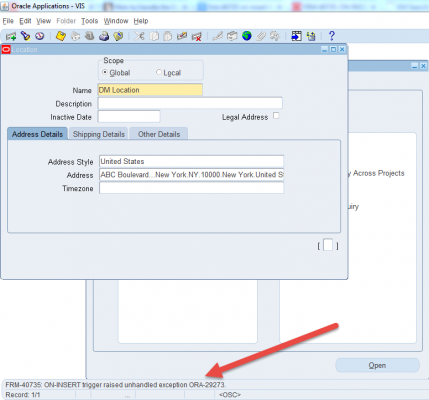
“FRM-40735:ON-UPDATE trigger raised unhandled exception ORA-29273”

SYMPTOMS:
Responsibility: Human Resources.
Navigation: Work Structures >Locations.
When try to create the Locations and save, the following error appears.


CAUSE:
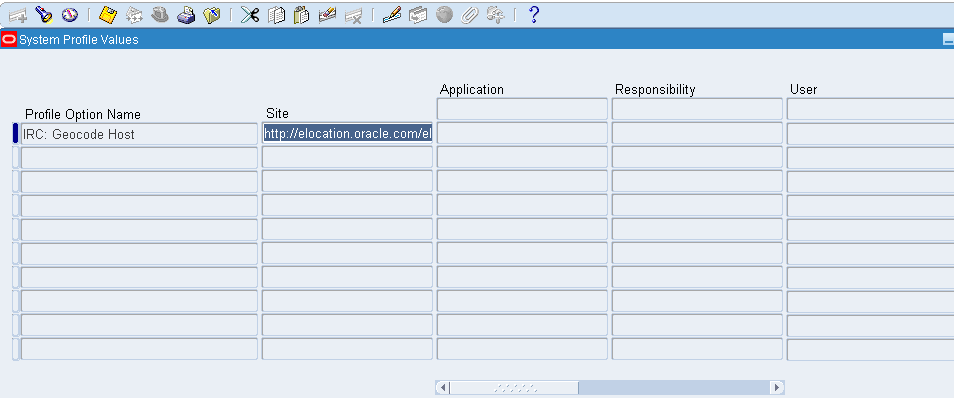
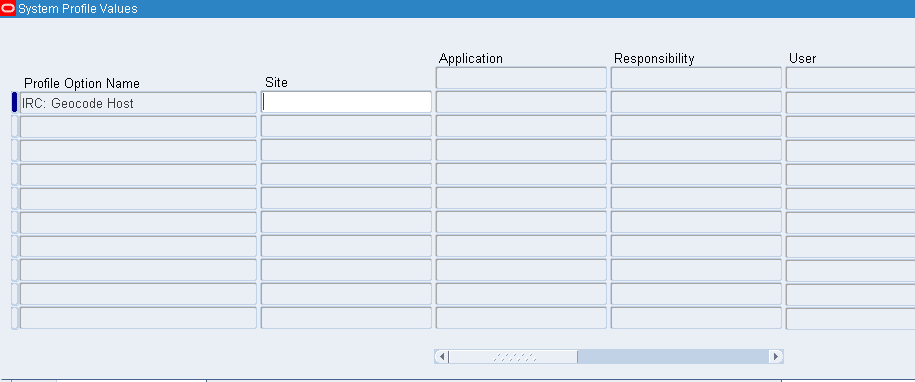
The "IRC: Geocode Host" was enable with the following setting http://elocation.oracle.com/servlets/lbs with out the DMZ being setup.
The problem is that if the elocation function is enabled, then any type of address form that is trying too be updated it will error out. This is because this function tries to make a call to the elocation severs which is outside the DMZ. What is happening is that the application is trying to get the longitude and latitude data and trying to update tables like the hr_locations_all table and per_addresses table. In this case the DMZ was not setup so the application could not make the call and thus will error out.
SOLUTION:
To implement the solution, please execute the following steps:

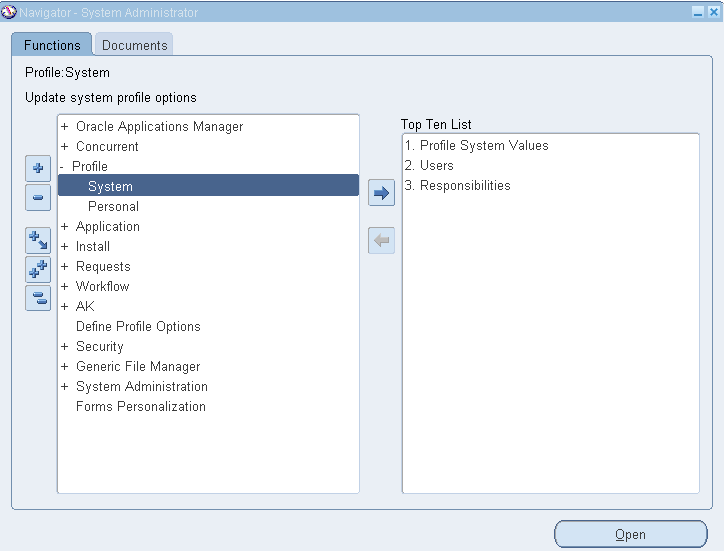
1. Go into the responsibility: System Administrator
2. Navigate to Profile > System.

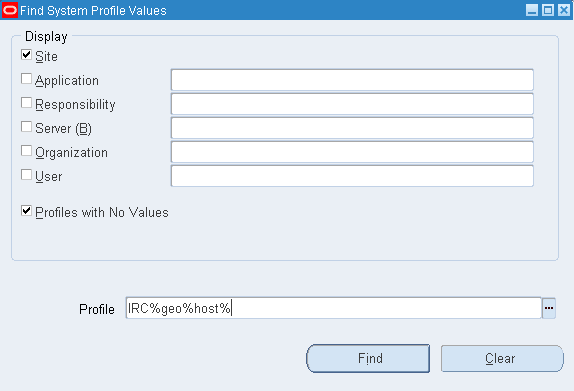
Click on Open and Query the Profile Option "IRC: Geocode Host".
Click on Find.

3. Clear the value at the Site level for the profile option "IRC: Geocode Host" and save.

4. Retest the issue:
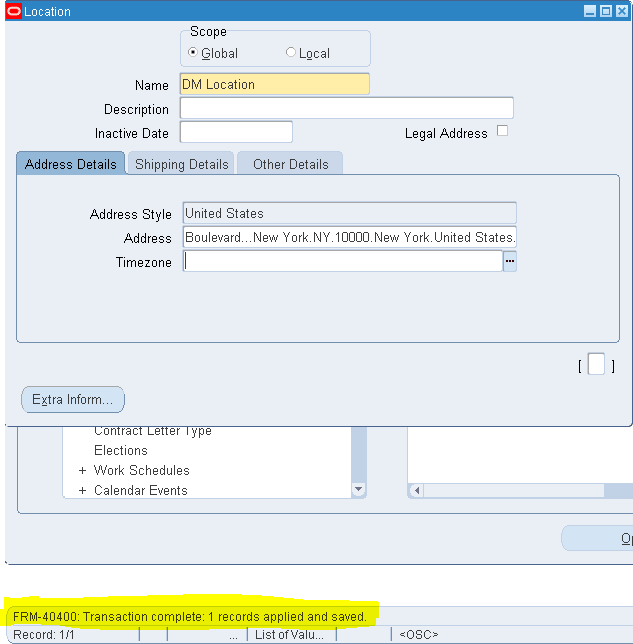
Now again go to Location form in oracle.
You can now create the location and save.

Tuesday, 13 January 2015

Query to find few business groups set up in the instance :

SELECT   business_group_id, name
    FROM   per_business_groups
   WHERE   LOWER (name) LIKE '%vision corporation%'
ORDER BY   name

Friday, 12 September 2014

How to Generate Employee Number through Programming in Oracle HRMS

There are following steps need to follow to generate employee number through programming:
Step #1:
Create the FUNCTION “Get_Next_Employee_Number”:
CREATE OR REPLACE Function APPS.Dafz_Get_Next_Employee_Number(p_Business_Group_Id In Number,
p_Emp_Type In Varchar2)
Return Varchar2 Is
v_Emp_No Varchar2(100) := ‘0000’;
Begin
If (p_Emp_Type = ‘EMP’) Then
Begin
Select ‘0’ || Max(To_Number(Papf.Employee_Number) + 1)
Into v_Emp_No
From Per_All_People_f Papf
Where Papf.Employee_Number Is Not Null
And Papf.Employee_Number Not Like ‘XX%’
And Papf.Employee_Number Like ‘0%’
And Papf.Business_Group_Id = p_Business_Group_Id;
Exception
When Others Then
v_Emp_No := ‘NULL';
End;
End If;
Return v_Emp_No;
End;
/
STEP # 2
Change the “HR:Business Group” & “HR: Security Profile” profile setting to “Setup Business Group
HR Business Group Profile Setting
STEP # 3
Define Function in Oracle HRMS Responsibility, switch to “UAE HRMS Responsibility” and open “DEFINE FUNCTION”
Create New Function and calling the above function in it:
Define Function

 Step # 4
Switch to Responsibility “UAE HRMS Manager”  then Total Compensation –> Basic –> Write Formulas, Search for “EMP_NUMBER_GENERATION
EMP NUM GEN
Edit this and update with below Fast Formula code:
/* ——————————————————————————————————-*/
/* NAME: EMP_NUMBER_GENERATION */
/* Returns the Next Employee Number.
/* Developed By: M Muzzammil Khan
/* Dated: 01-May-2013 */
/*——————————————————————————————————-*/
DEFAULT FOR Person_number IS ‘0000’
DEFAULT FOR Party_ID IS 0
DEFAULT FOR Person_ID IS 0
DEFAULT FOR National_ID IS ‘0000’
DEFAULT FOR Date_Of_Birth IS ‘1900/01/01 00:00:00′ (date)
DEFAULT FOR Hire_Date IS ‘1900/01/01 00:00:00′ (date)
INPUTS ARE
Legislation_Code (text),
Person_Type (text),
Person_number (text),
Party_id,
Person_id,
Date_of_birth (date),
Hire_date (date),
National_ID (text)
Next_number = ‘0000’
IF person_type = ‘EMP’ then
(
Next_Number = DAFZ_Get_Next_Employee_Number(81,Person_Type)
)
RETURN Next_number

 STEP # 5
Save and compile the Fast formula and then try to create new staff from HRMS responsibility, you will see it will generate the new staff # through programming.
Feel free to contact me if further details required.

Tuesday, 22 July 2014

Employee with supervisor and Org detail Query

/* Formatted on 7/22/2014 10:30:06 AM (QP5 v5.115.810.9015) */
SELECT p.full_name,
       p.employee_number employee_number,
       p.last_name last_name,
       p.first_name first_name,
       p.original_date_of_hire hire_date,
       p.date_of_birth dob,
       p.sex gender,
       p.email_address email_address,
       (SELECT name
        FROM apps.hr_all_organization_units
        WHERE organization_id = p.business_group_id)
          organization,
       (SELECT location_code
        FROM apps.hr_locations_all_tl
        WHERE location_id = a.location_id AND language = USERENV ('LANG'))
          location_name,
       'A' status_flag,
       (SELECT concatenated_segments
        FROM apps.gl_code_combinations_kfv
        WHERE code_combination_id = a.default_code_comb_id)
          expense_account,
       (SELECT papf1.full_name supervisor_name
        FROM apps.per_all_people_f papf,
             apps.per_all_assignments_f paaf,
             apps.per_all_people_f papf1
        WHERE     papf.person_id = paaf.person_id
              AND paaf.primary_flag = 'Y'
              AND paaf.assignment_type = 'E'
              AND paaf.supervisor_id = papf1.person_id
              AND papf1.current_employee_flag = 'Y'
              AND papf.business_group_id = paaf.business_group_id
              AND SYSDATE BETWEEN papf.effective_start_date
                              AND  papf.effective_end_date
              AND SYSDATE BETWEEN paaf.effective_start_date
                              AND  paaf.effective_end_date
              AND SYSDATE BETWEEN papf1.effective_start_date
                              AND  papf1.effective_end_date
              AND papf.employee_number = p.employee_number
              AND papf.person_id = p.person_id)
          supervisor
FROM apps.per_all_people_f p,
     apps.per_all_assignments_f a,
     apps.pay_people_groups ppg,
     apps.hr_all_positions_f hap
WHERE     p.person_id = a.person_id
      AND SYSDATE BETWEEN p.effective_start_date AND p.effective_end_date
      AND SYSDATE BETWEEN a.effective_start_date AND a.effective_end_date
      AND a.people_group_id = ppg.people_group_id
      AND hap.position_id(+) = a.position_id

Tuesday, 8 July 2014

List Salesrep Salary Query


/* Formatted on 7/8/2014 9:33:33 AM (QP5 v5.115.810.9015) */
SELECT p.person_id,
       p.full_name,
       p.employee_number,
       p.business_group_id,
       (pp.proposed_salary_n * b.pay_annualization_factor) salary,
       e.aei_information3 variable
FROM per_all_people_f p,
     per_all_assignments_f a,
     per_pay_proposals pp,
     per_pay_bases b,
     per_assignment_extra_info e
WHERE     NVL (p.effective_start_date, SYSDATE) <= SYSDATE
      AND p.person_id = 19637
      AND NVL (p.effective_end_date, SYSDATE) >= SYSDATE
      AND p.person_id = a.person_id
      AND NVL (a.effective_end_date, SYSDATE) >= SYSDATE
      AND pp.assignment_id = a.assignment_id
      AND (NVL (pp.date_to, SYSDATE) >= SYSDATE
           OR pp.date_to = (SELECT MAX (pp_sub.date_to)
                            FROM per_pay_proposals pp_sub
                            WHERE pp_sub.assignment_id = pp.assignment_id))
      AND b.pay_basis_id = a.pay_basis_id
      AND e.assignment_id = a.assignment_id
      AND e.information_type = 'SSFT_COMMISSION_PLAN'
      AND e.aei_information4 IN
               ('Commission Direct Selling',
                'Commission Sales Support',
                'Commission Sales Engineers')
      AND NVL (TO_DATE (e.aei_information1, 'DD-MON-YYYY'), SYSDATE) <=
            SYSDATE
      AND NVL (TO_DATE (e.aei_information2, 'DD-MON-YYYY'), SYSDATE) >=
            SYSDATE;

Friday, 4 July 2014

How to Query Position Hierarchy Chain of Command For A User

How to query position hierarchy chain of command for a user?

This is helpful when troubleshooting issues like 'Approval List Could Not Be Generated' when using position hierarchy.

Solution:-

 
 1.  Use the following query to determine the hierarchies to which a particular User belongs, and to identify those persons and users above the starting point User within each relevant hierarchy for this user.


/* Formatted on 7/4/2014 11:29:53 AM (QP5 v5.115.810.9015) */
SELECT peha.position_structure_id,
       peha.employee_id,
       fndu.user_id,
       ppos.position_id,
       pps.name hierarchy,
       fndu.user_name username,
       papf.full_name person,
       ppos.name position,
       peha.superior_level superiorpositionlevel,
       ppos2.name superiorposition,
       papf2.full_name superiorperson,
       fndu2.user_name superiorusername,
       peha.superior_id superiorpersonid,
       fndu2.user_id superioruserid,
       ppos2.position_id superiorposid
FROM po_employee_hierarchies_all peha,
     per_positions ppos,
     per_positions ppos2,
     per_all_people_f papf,
     per_all_people_f papf2,
     fnd_user fndu,
     fnd_user fndu2,
     per_position_structures pps
WHERE     pps.business_group_id = peha.business_group_id
      AND pps.position_structure_id = peha.position_structure_id
      AND fndu2.employee_id = papf2.person_id
      AND papf2.person_id = peha.superior_id
      AND papf2.effective_end_date > SYSDATE
      AND papf.person_id = peha.employee_id
      AND papf.effective_end_date > SYSDATE
      AND ppos2.position_id = peha.superior_position_id
      AND ppos.position_id = peha.employee_position_id
      AND peha.superior_level > 0
      AND peha.employee_id = fndu.employee_id
      AND fndu.user_name = UPPER ('&StartingUsername')
ORDER BY peha.position_structure_id, peha.superior_level, papf2.full_name


The above query may return multiple names for a certain level.  This is because position hierarchy allows multiple persons to hold the same position.  When routing purchasing documents for approval the first person alphabetically (based on full_name) for that level position will be used for routing the document up the hierarchy.

2. Use the following query to find the Hierarchy value specified in the Purchasing document types form. 

This will show which position_structure_id to focus on in the above query.  Change the org_id value, document_type_code, and document_subtype as required, depending on the document and organization you are troubleshooting. 

This query will only return a result if the document type is currently setup for hierarchy routing.


/* Formatted on 7/4/2014 11:31:36 AM (QP5 v5.115.810.9015) */
SELECT pdt.document_subtype,
       pdt.document_type_code,
       pps.name hierarchy,
       pdt.default_approval_path_id
FROM po_document_types_all_b pdt, per_position_structures pps
WHERE     pps.position_structure_id = pdt.default_approval_path_id
      AND pdt.org_id = 204
      AND pdt.document_type_code = 'REQUISITION'
      AND pdt.document_subtype = 'PURCHASE'

How To Query Supervisor Chain Of Command For A User

How to query for supervisors hierarchy above an approver user when using employee supervisor chain of command?

Solution
Substitute the username in place of DCROCKETT in the following query.  This is useful when troubleshooting approval
list issues with employee supervisor relationships for requisitions and purchasing documents

/* Formatted on 7/4/2014 11:28:25 AM (QP5 v5.115.810.9015) */
SELECT fndu.user_name, pecx.full_name
FROM fnd_user fndu,
     per_employees_current_x pecx,
     (SELECT pera.supervisor_id             --, fndu.user_name, pecx.full_name
      FROM per_assignments_f pera
      WHERE EXISTS
               (SELECT '1'
                FROM per_people_f perf, per_assignments_f pera1
                WHERE TRUNC (SYSDATE) BETWEEN perf.effective_start_date
                                          AND  perf.effective_end_date
                      AND perf.person_id = pera.supervisor_id
                      AND pera1.person_id = perf.person_id
                      AND TRUNC (SYSDATE) BETWEEN pera1.effective_start_date
                                              AND  pera1.effective_end_date
                      AND pera1.primary_flag = 'Y'
                      AND pera1.assignment_type = 'E'
                      AND EXISTS
                            (SELECT '1'
                             FROM per_person_types ppt
                             WHERE ppt.system_person_type IN ('EMP', 'EMP_APL')
                                   AND ppt.person_type_id = perf.person_type_id))
      START WITH pera.person_id = (SELECT employee_id
                                   FROM fnd_user
                                   WHERE user_name = 'DCROCKETT') -- ** Replace DCROCKETT with your username
                 AND TRUNC (SYSDATE) BETWEEN pera.effective_start_date
                                         AND  pera.effective_end_date
                 AND pera.primary_flag = 'Y'
                 AND pera.assignment_type = 'E'
      CONNECT BY PRIOR pera.supervisor_id = pera.person_id
                 AND TRUNC (SYSDATE) BETWEEN pera.effective_start_date
                                         AND  pera.effective_end_date
                 AND pera.primary_flag = 'Y'
                 AND pera.assignment_type = 'E') c
WHERE fndu.employee_id = c.supervisor_id
      AND pecx.employee_id = c.supervisor_id

Query to display Compentencies related to Employee

/* Formatted on 7/4/2014 11:16:24 AM (QP5 v5.115.810.9015) */
SELECT pap.person_id,
       pap.full_name appraiser,
       pc.name compentency,
       NVL2 (prl1.name, prl1.step_value || '-' || prl1.name, prl1.step_value)
          AS emp_prof_level,
       pce.comments,
       prl1.step_value
FROM per_competence_elements pce,
     per_rating_levels_vl prl1,
     per_rating_levels_vl prl2,
     per_rating_levels_vl prl3,
     per_all_people_f pap,
     per_competences pc
WHERE     pce.proficiency_level_id = prl1.rating_level_id(+)
      AND pce.rating_level_id = prl2.rating_level_id(+)
      AND pce.weighting_level_id = prl3.rating_level_id(+)
      AND object_id = pap.person_id
      AND pc.competence_id = pce.competence_id
      AND TRUNC (SYSDATE) BETWEEN pap.effective_start_date
                              AND  effective_end_date
      AND pce.object_name = 'ASSESSOR_ID'
      AND pce.object_id IN
               (SELECT perp.person_id
                FROM per_participants perp, per_assessments pass
                WHERE     perp.participation_in_id = pass.appraisal_id
                      AND perp.participation_in_table = 'PER_APPRAISALS'
                      AND perp.participation_in_column = 'APPRAISAL_ID'
                      AND pass.assessment_id = pce.assessment_id
                      AND pass.appraisal_id = 74515---(Appraisal id receieved from previous query)
               );

Monday, 9 June 2014

HRMS update position API

/* Formatted on 6/9/2014 11:48:05 AM (QP5 v5.115.810.9015) */
DECLARE
   v_validate                       BOOLEAN := FALSE;
   v_attribute20                    VARCHAR2 (100) := NULL;
   v_valid_grades_changed_warning   BOOLEAN;

   CURSOR c1
   IS
      SELECT position_id, object_version_number, position_definition_id, name
      FROM per_all_positions
      WHERE position_id = 60549;
BEGIN
   FOR a IN c1
   LOOP
      hr_position_api.update_position (p_validate => v_validate,
                                       p_position_id => a.position_id,
                                       p_object_version_number => a.object_version_number,
                                       p_attribute20 => v_attribute20,
                                       p_position_definition_id => a.position_definition_id,
                                       p_name => a.name,
                                       p_valid_grades_changed_warning => v_valid_grades_changed_warning
      );
   END LOOP;
END;

HRMS update job API

/* Formatted on 6/9/2014 12:53:58 PM (QP5 v5.115.810.9015) */
DECLARE
   v_validate                       BOOLEAN := FALSE;
   v_date                           DATE := NULL;
   v_valid_grades_changed_warning   BOOLEAN;

   CURSOR c1
   IS
      SELECT job_id, object_version_number, job_definition_id, name
      FROM per_jobs
      WHERE job_id = 35997;
BEGIN
   FOR a IN c1
   LOOP
      hr_job_api.update_job (p_validate => v_validate,
                             p_job_id => a.job_id,
                             p_object_version_number => a.object_version_number,
                             p_date_to => v_date,
                             p_job_definition_id => a.job_definition_id,
                             p_name => a.name,
                             p_valid_grades_changed_warning => v_valid_grades_changed_warning
      );
   END LOOP;
END;

Friday, 6 June 2014

Delete HRMS Job API

DECLARE
   p_validate   BOOLEAN;
   v_validate   BOOLEAN := FALSE;

   CURSOR c1
   IS
  
   select job_id,object_version_number from per_jobs where job_id = 35952;
  
BEGIN
   FOR a IN c1
   LOOP
     hr_job_api.delete_job (p_validate => v_validate,
                                       p_job_id => a.job_id,
                                       p_object_version_number => a.object_version_number
      );
   END LOOP;
END;

Delete HRMS Position API

/* Formatted on 6/6/2014 11:37:49 AM (QP5 v5.115.810.9015) */
DECLARE
   p_validate   BOOLEAN;
   v_validate   BOOLEAN := FALSE;

   CURSOR c1
   IS
      SELECT position_id, object_version_number
      FROM per_all_positions
      WHERE position_id = 60491;
BEGIN
   FOR a IN c1
   LOOP
      hr_position_api.delete_position (p_validate => v_validate,
                                       p_position_id => a.position_id,
                                       p_object_version_number => a.object_version_number
      );
   END LOOP;
END;

Thursday, 22 May 2014

Oracle HRMS Organizations Technical Details

Tables:-

HR_ALL_ORGANIZATION_UNITS
The basic details of an organization are stored here.
There is also a translation table HR_ALL_ORGANIZATION_UNITS_TL for the organization
name in each language installed.

HR_ORG_INFORMATION_TYPES
This holds the different types of organization information.
Each type is defined in the Org Developer DF as a context value. eg Work Day Information,
Business Group Information, etc.
When using the Organizations screen you would see the information types relevant to the
org classification.

HR_ORG_INFO_TYPES_BY_CLASS
This table holds the org information types that are available for each classification.
This data is seeded and there is no screen that displays these groupings.
When you select a classification on the Org screen and press the Other button, this table is
referenced to display the relevant org information types.

HR_ORGANIZATION_INFORMATION
This table is more complicated as it stores two distinct sets of information.
To know which type of information is stored you need to check the value in column

ORG_INFORMATION_CONTEXT.
When the value is 'CLASS' the row is used to link an organization to a classification. There
will be one row for every classification used by an organization. The classification name is
held in column ORG_INFORMATION1.
If you create an organization, a row will be added here for every classification you save
against that org.
When the value is set to an information type (from HR_ORG_INFORMATION_TYPES) the
columns ORG_INFORMATION1-20 are used to hold the values for that information type.
So when you are in the Define Organizations screen and you press the others button and
select an information type, the values you see in the fields on the screen come from this
table.
The information type is a dff context with some segments defined. Each segment is mapped
to one of the ORG_INFORMATIONx columns in this table. When you open the information
type field you see the individual segments and the value for each segment is held in the
column in table HR_ORGANIZATION_INFORMATION that matches the column specified in
the segment definition.
The lookup ORG_TYPE holds values for the 'Type' field on the Define Organization screen.
The lookup ORG_CLASS holds values for the Classifications Name field on the Define
Organization screen.

SQL> select i.organization_id, o.name, l.meaning
from hr_all_organization_units o
, hr_organization_information i
, fnd_lookup_values l
where o.organization_id = i.organization_id
and o.name = '&Organization_Name'
and i.org_information1 = l.lookup_code
and l.lookup_type = 'ORG_CLASS'
and i.org_information_context = 'CLASS';

This sql will prompt you for an organization information values

SQL> select o.name
, i.org_information1 Normal_Start_Time
, i.org_information2 Normal_End_Time
, i.org_information3 Working_Hours
, i.org_information4 Frequency
from hr_organization_information i
, hr_all_organization_units o
where o.name = '&Organization_Name'
and o.organization_id = i.organization_id


and i.org_information_context = 'Work Day Information';

Thursday, 15 May 2014

Why is the 'Database Item' of type 'DATE' not created when saving a element in Oracle Payroll


When trying to create a database item of type 'DATE' in the input values, the Element must have the 'Multiple Entries Allowed' check-box UNCHECKED.

Navigate: - Global HRMS Manager --> Total Compensation --> Basic --> Element Description


Why is the 'Database Item' of type 'DATE' not created when saving a element in Oracle Payroll

Database item is created for date data type.


Why is the 'Database Item' of type 'DATE' not created when saving a element in Oracle Payroll

Can I define new Primary Element Classification in Oracle Payroll

PAY_ELEMENT_CLASSIFICATIONS holds the definitions of element classification that define groups of elements for legislation and information needs. 

Primary classifications are specific to a legislation and are predefined for all supported payroll legislation's, for example Earnings. Users may not create, amend or delete primary classifications.


So what can be done as an alternative??


  • Secondary, or sub-classifications, are specific to a business group and may be predefined for a specific legislation. 

  • Users can create, update and delete their own secondary classifications, but may not change any that are predefined
Navigation: Global HRMS Manager --> Total Compensation --> Basic --> Classification

Can I define new Primary Element Classification in Oracle Payroll